Case study · SuperPunch
Rethinking the Enterprise Dashboard: Info Hierarchy and Color Semantics at Scale
A supervisor's dashboard should answer one question in under five seconds:
What needs my attention right now?
The original SuperPunch dashboard answered a different question entirely — and I spent two years watching what that cost before I could do anything about it.
Timeline
2020 – 2025
Dashboard module
active throughout
My role
2020 – 2022
Junior → Mid UI
Designer
2023 – 2025
Sole Designer (UI +
UX)
Collaborators
Product
Managers,
Engineering Leads
Project
Workforce mgmt.,
Call Center Infrastructure
Context
Working within a direction I didn't choose
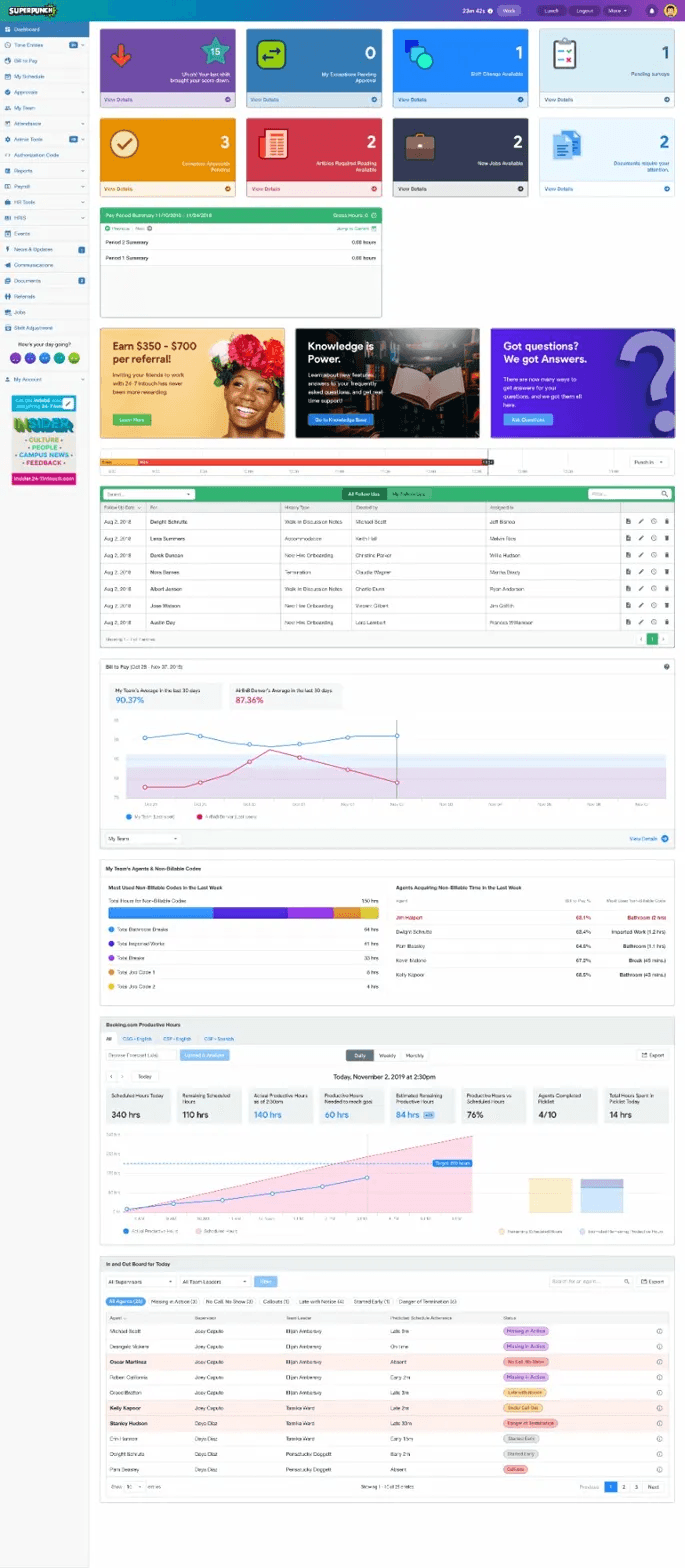
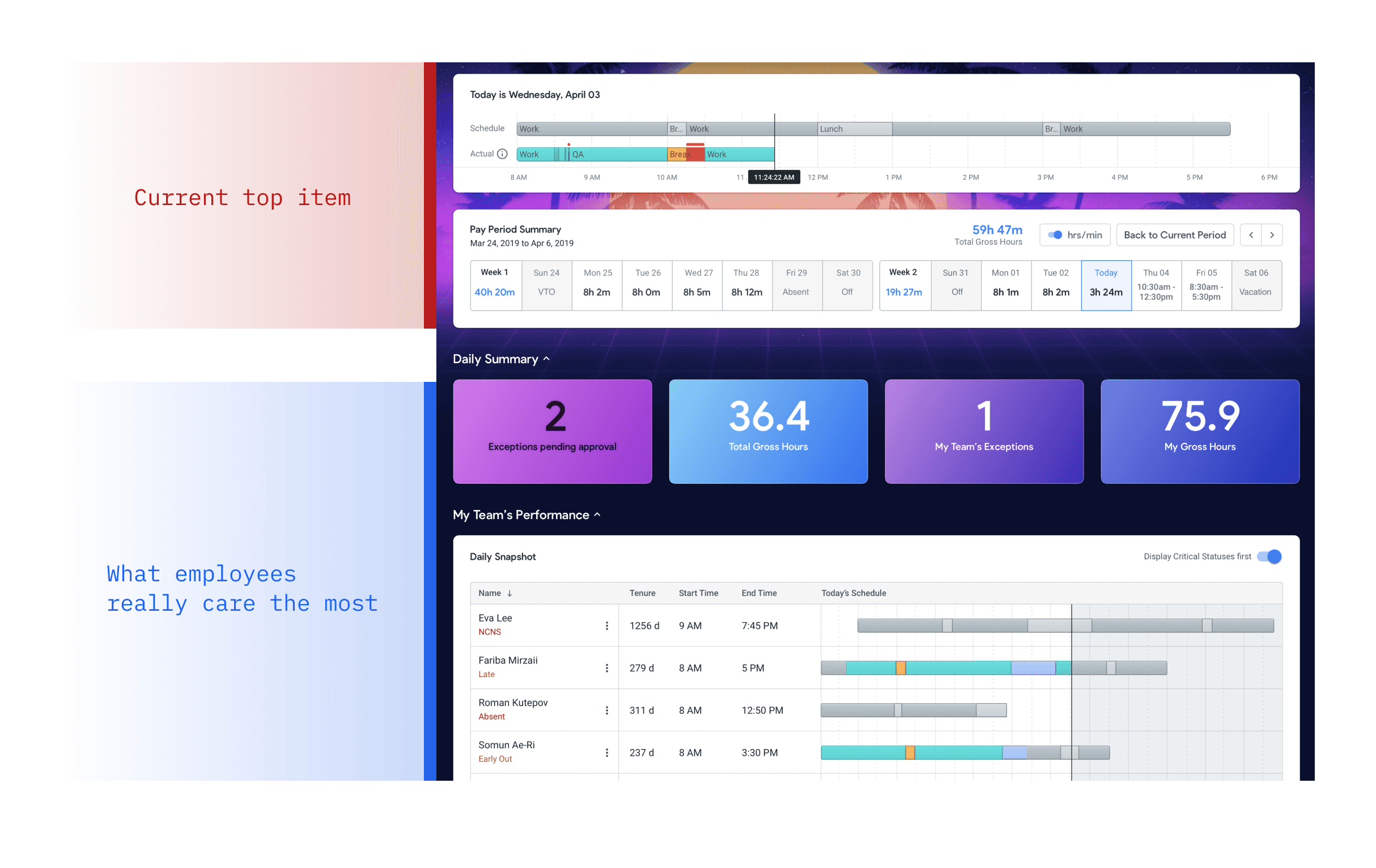
V1 — the light-mode version built before I joined — opened with a personal schedule timeline and a pay period summary. Both read-only. Both irrelevant to anyone whose job is managing a team of fifteen people. The action items sat below the fold, visually equal to each other, styled in gradients with no semantic logic.
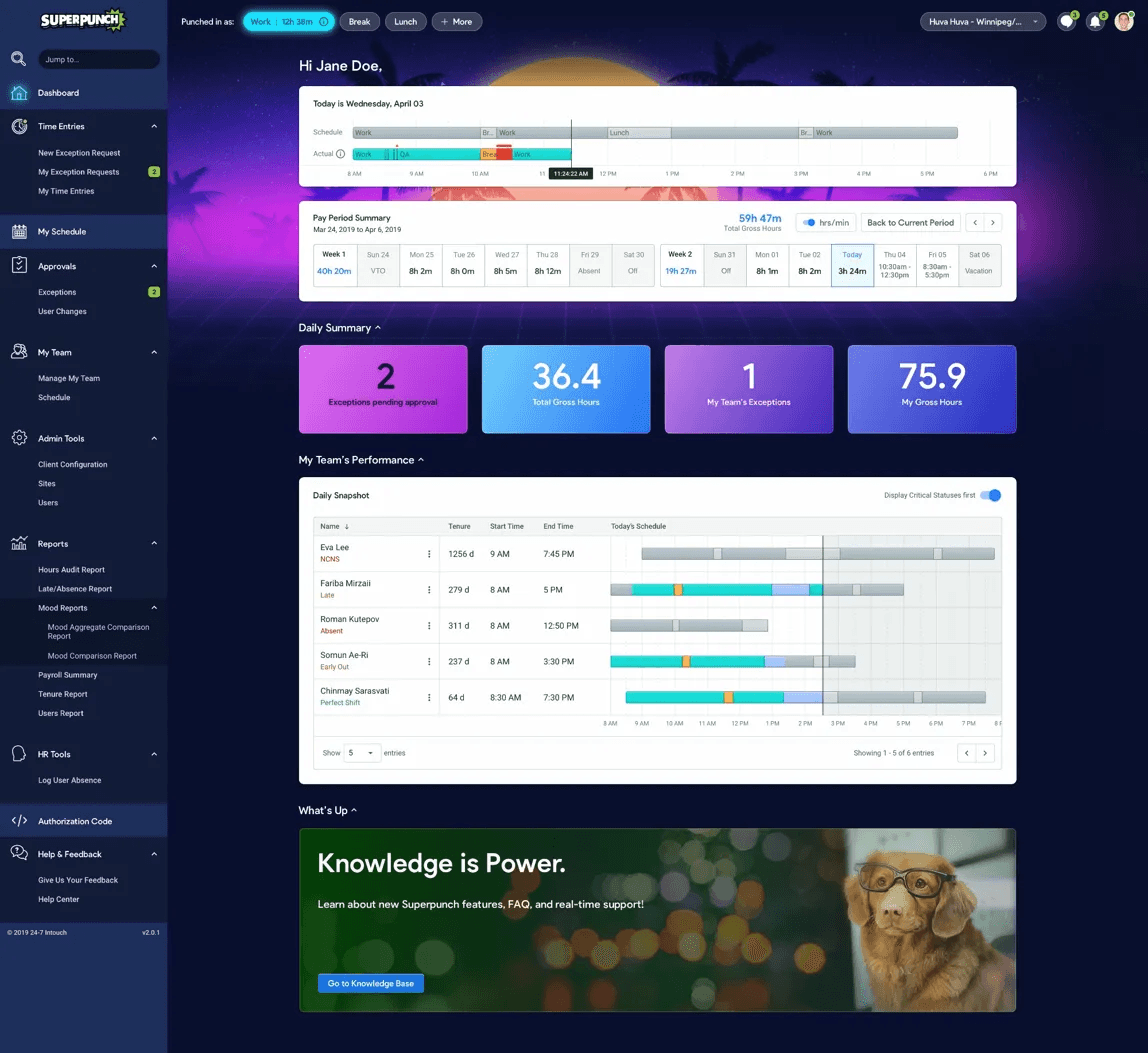
V2 — the dark-mode redesign introduced shortly after I joined — kept the same information hierarchy and made it worse aesthetically. A synthwave sunset with palm trees sat behind the header. The action cards went from four mismatched colours to five mismatched gradients. Pink-violet, orange, blue, teal — every card the same size, the same weight.
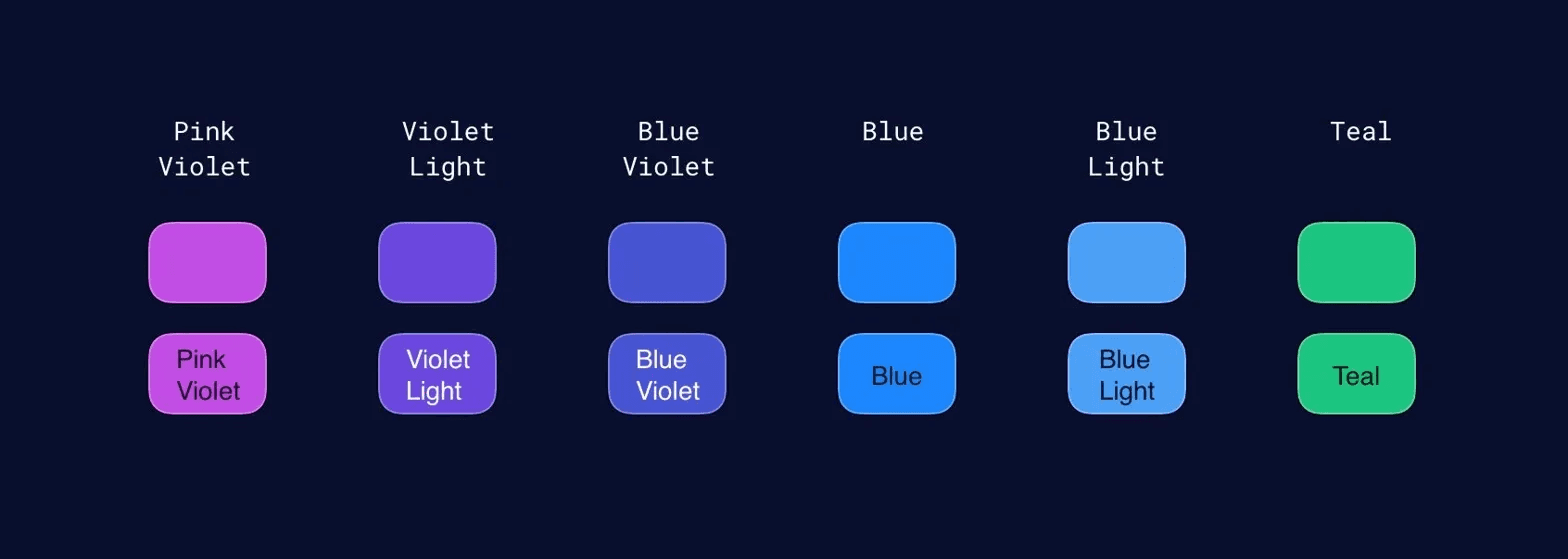
I checked the colour contrast on those cards as my first assignment. Most passed WCAG AA. But passing contrast ratios on decoratively random colours doesn't mean anything is readable in the way that matters — at 7am, under pressure, when someone has already missed three notifications.
The visual direction had been approved by the CEO, who had a personal affinity for 80s synthwave aesthetics. I flagged the problems in project meetings more than once. I didn't have the leverage to change the direction. So I worked within it, and I watched what happened.
This case study is what I would have done if I'd had that leverage — and what I did do, once I finally had enough room to move.
Problem diagnosis
What was actually wrong
Information hierarchy built for the wrong user
The dashboard opened with a personal schedule timeline and pay period summary — information useful to a front-line agent, not a Team Leader or Operations Manager. By the time someone reaches a supervisory role, they know their own schedule. The first thing they actually need is: who on my team has a problem right now? That answer was below the fold.
Action items with no priority signal
Exceptions pending approval — if unresolved, they affect an agent's attendance score and otentially their paycheck.
Pending surveys — a quarterly satisfaction form. Both the same card size. Both the same visual weight.
The design treated them as equivalent. They're not. One has real downstream consequences; the other can wait until Friday.
Single-column layout with massive unused space
The content ran in a single column down the centre of the screen, leaving wide margins on both sides. Key data — team performance, the issues dashboard — required scrolling to reach. On a 1440px wide screen in a control-room environment, this is a real problem. Supervisors aren't leisurely browsing. They're scanning.
Colour used as decoration, not communication
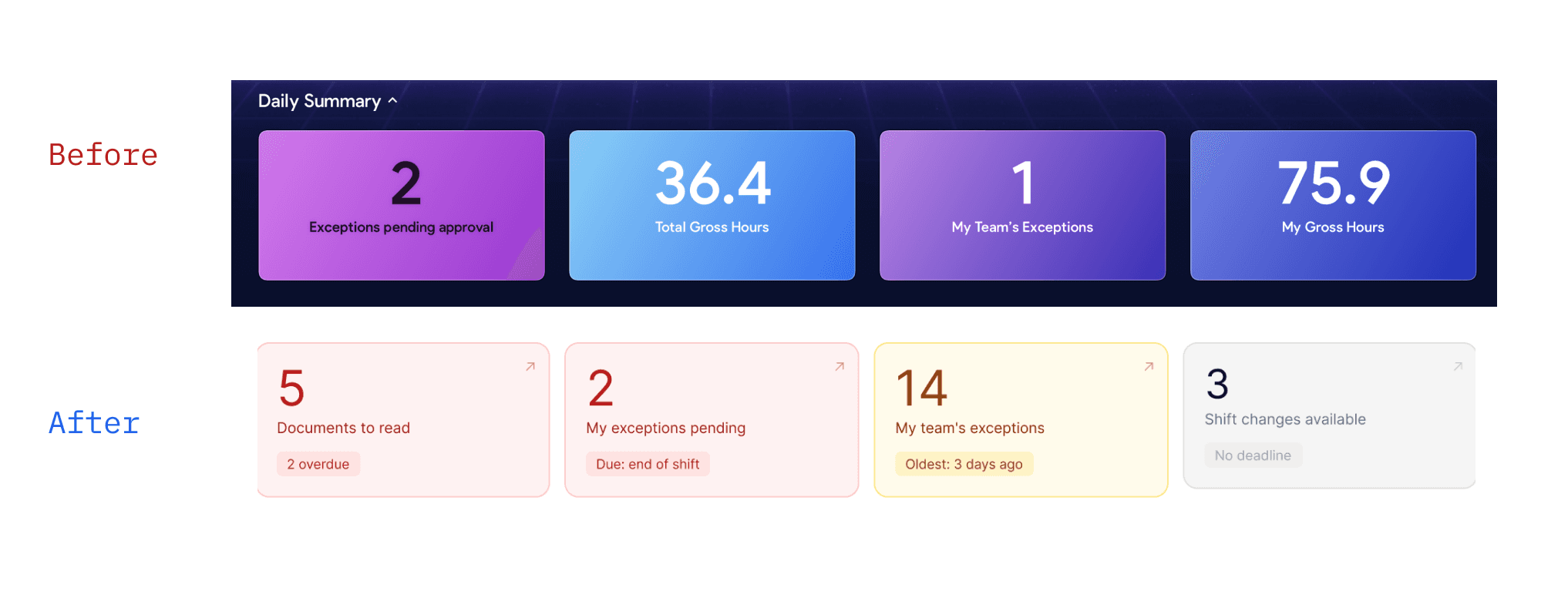
Pink-violet gradients for exceptions. Orange for attendance scores. Blue for shift changes. Teal for HR forms. The colours were vivid, varied, and meaningless. There was no system. Users couldn't learn from them — which means every interaction started from scratch, every time.
Design decisions
What I changed, and the thinking behind it
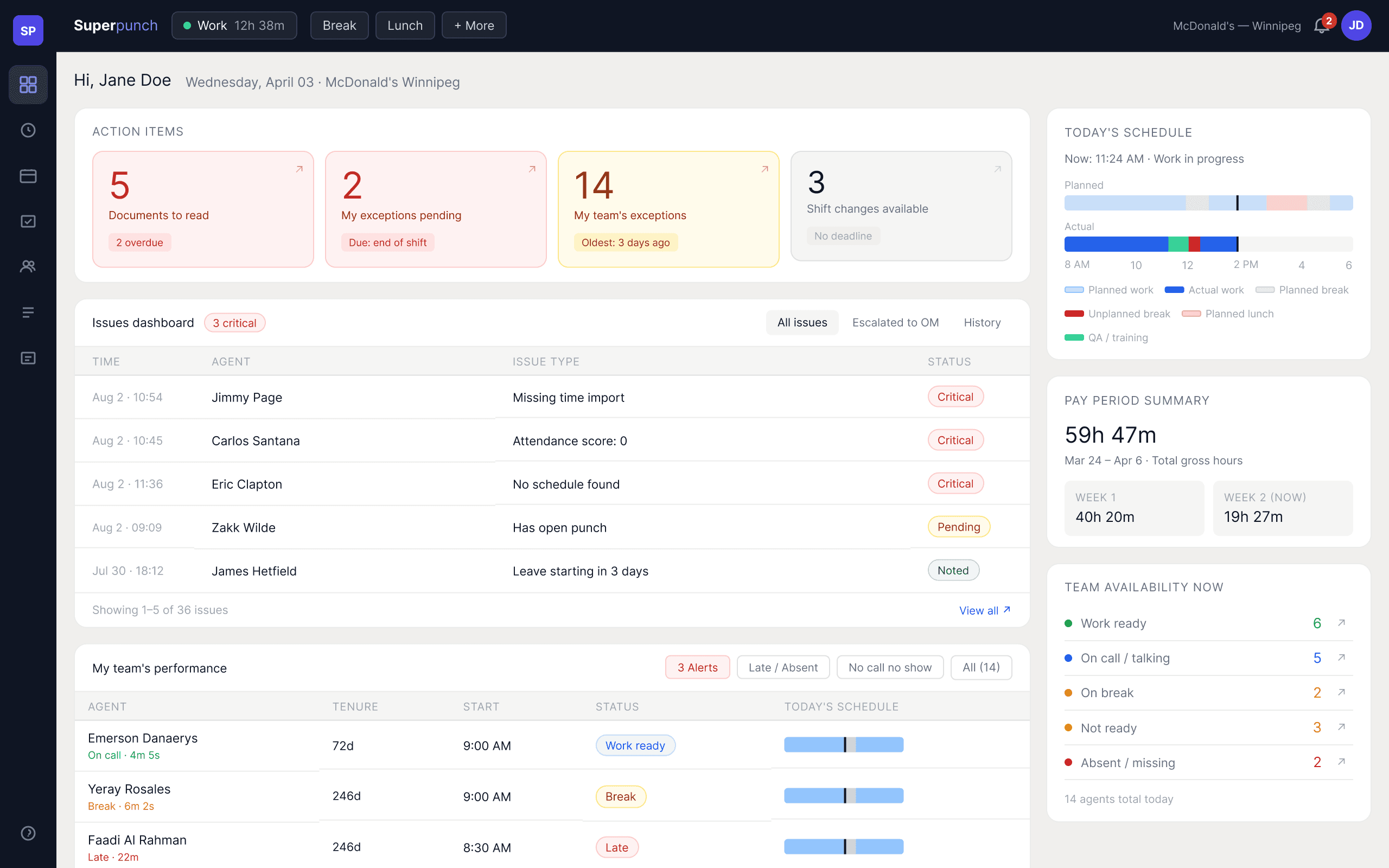
Single-column → two-column F-pattern grid
Before
One column, centred, with large margins on both sides. Key components — issues dashboard, team performance — required scrolling. Critical information wasn't visible without effort.
After
A 65/35 two-column grid. Action items, issues
dashboard, and team performance anchor the left. Schedule timeline, pay period, and team availability move to the right as secondary reference. The most critical information is always at the top left — where supervisors look first.
This follows how people actually scan under time pressure. The F-pattern isn't a design trend; it's a description of how supervisors read a screen at the start of a shift. Putting read-only personal data at the top of that pattern was a hierarchy error.
A colour system that means something
The gradient rainbow was replaced with four values, each tied to urgency rather than feature identity:
Red — act now
Overdue documents. Exceptions due end of shift. Something has a hard deadline, and it's close or already past.
Amber — watch this
Team exceptions awaiting approval. No fixed deadline, but the oldest item is three days ago. Needs attention soon, not immediately.
Grey — when you're ready
Shift change requests available. The user decides whether to act. No deadline, no urgency.
Green — resolved / complete
Issues closed. Tasks done. The colour means you don't need to read the text to know the outcome.
The same colours mean the same things everywhere in the platform. Red always means act now — in action cards, status pills, issue badges. Once a user learns the system, they stop reading and start scanning. That's the goal.
Action cards redesigned for scannability
The original cards showed a large number and a label. The redesign adds one more layer: a time-pressure tag. A small coloured chip that reads "2 overdue" or "Due: end of shift" or "Oldest: 3 days ago." The card tells you whether this is a five-minute problem or a tomorrow problem, without making you click through to find out.
I considered adding action verbs — "Review & approve", "Submit exceptions" — as a third line on each card. I removed them. The arrow in the top-right corner is enough to signal the card is clickable. The label already says what it contains. A third line of instructional text cluttered the card without adding information.
Issues dashboard elevated
The Issues Dashboard — the component that shows every open team issue, sortable by severity, with expandable detail rows and action buttons — appeared after scrolling past the schedule timeline, pay period summary, and action card grid. It was the most operationally critical component on the page, and it was below the fold.
In the redesign it moves directly below the action cards, at the top of the primary column. A supervisor who opens the dashboard and sees "3 critical" on the Issues badge knows exactly where to look first.
Today's schedule: moved and refined
The schedule timeline — a horizontal bar showing planned vs. actual — is still present. It belongs on the dashboard because it gives supervisors a quick check on their own day before they start managing others'. But it doesn't belong at the top.
It moves to the right column, compact and secondary. Planned schedule is rendered in semi- transparent fills; actual in solid colour. Same colour per activity type — so the deviation is immediately visible without reading any labels.
Design principles
What this module forced me to articulate
Working through the homepage surfaced a set of rules that then governed every other
component I touched in this platform.
Colour encodes urgency, not identity
A card's colour should tell you how fast you need to respond, not which feature it belongs to. Feature-based colour systems force users to memorise a legend. Urgency-based systems are self-explanatory.
Every number needs context
A standalone "14" means nothing. "14 team exceptions — oldest 3 days ago" means something you can act on. Numbers without time reference, trend, or threshold are decoration.
Screen real estate in a B2B tool is a resource
Single-column layouts that leave 40% of a widescreen empty aren't clean — they're wasteful. Supervisors working eight-hour shifts in high-pressure environments benefit from density done right: tight, scannable, no scrolling to reach critical data.
Role-appropriate defaults
The same platform serves front-line agents and operations managers. Showing a manager their personal timesheet first is a hierarchy error, not a UX preference. Default state should reflect what the primary user needs in the first ten seconds, not what's easiest to build.
Reflection
What I'd still want to do
Team availability as a drill-down
The "team availability now" card shows counts by status — work ready, on call, on break, absent. It's useful as a quick read. But clicking a number should filter the team performance table to show only agents in that state. That interaction wasn't scoped in this redesign. It's the obvious next step, and it would make the right column feel active rather than passive.
Severity-first sorting in issues dashboard
The issues dashboard shows open issues in a flat list, chronological by default. A severity-sorted view — critical on top, regardless of time — would better serve the "what needs me first" use case. The toggle existed in the original design ("Display Critical Statuses first") but defaulted to off. It should default to on. A small thing. Real cost to supervisors who never discovered the toggle.
What I learned from not being able to change the visual direction
Two years of working inside a design direction I disagreed with taught me something useful: the visual layer and the structural layer are separable. I couldn't change the palm trees and the gradients. But I could improve the information architecture, the component hierarchy, and the interaction logic incrementally — and those improvements persisted even as the visual style evolved.
The retrospective redesign in this case study resolves what I couldn't move in production. But the thinking behind it was developed inside the constraint, not after leaving it.
Currently open to new
opportunities.
Let's build something that works for the workers.